


The sign() function returns the sign of its argument. It indicates whether its argument is positive, negative, or zero.
sign(number)

number.sign()
Code language: JavaScript (javascript)
sign() accepts only numbers; it will not auto-convert Booleans or other data types.
sign(-5) /* Output: -1 */

5.sign() /* Output: 1 */

sign(0) /* Output: 0 */

"-1".toNumber().sign() /* Output: -1 */
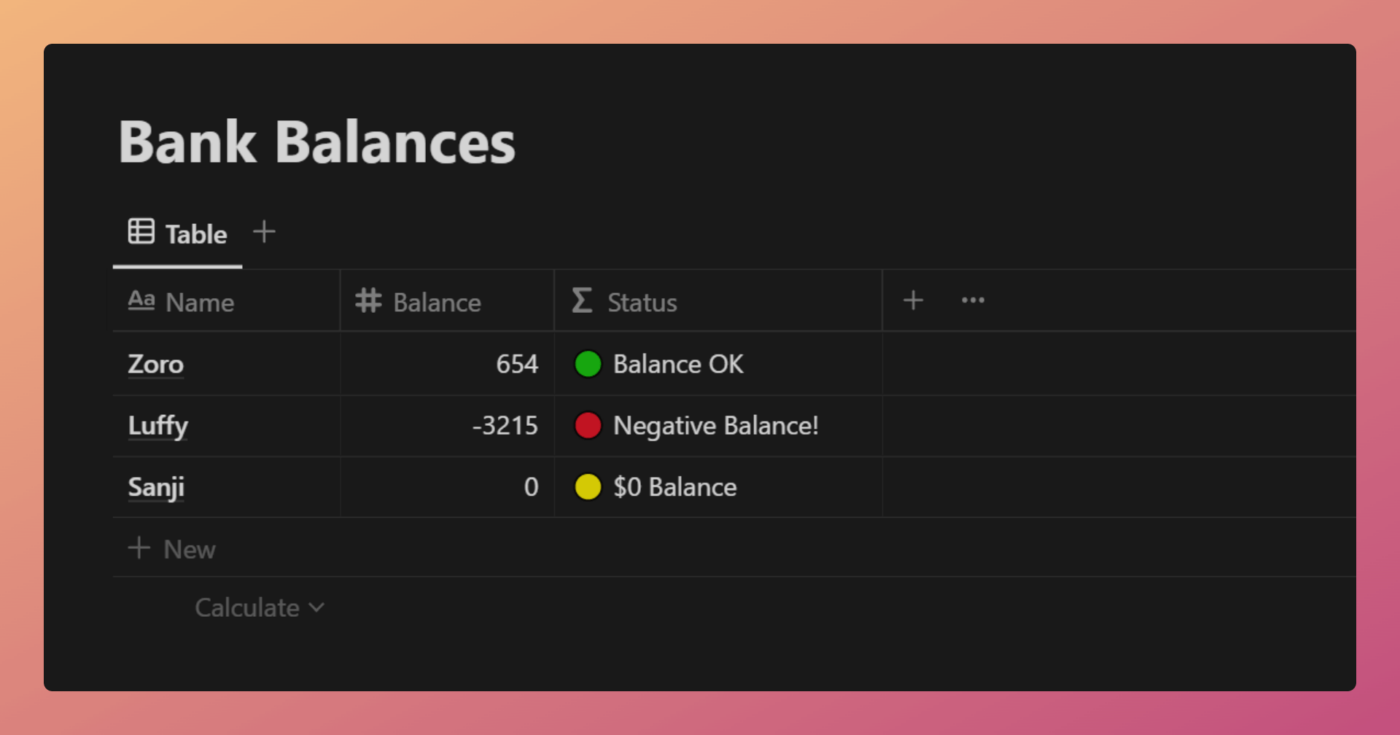
Code language: JavaScript (javascript)The example database below lists bank account balances. The sign() function is used to determine the output of the Status property.
Notion – The all-in-one workspace for your notes, tasks, wikis, and databases.
A new tool that blends your everyday work apps into one. It’s the all-in-one workspace for you and your team

ifs(
	sign(
		prop("Balance")
	) == -1,
	"🔴 Negative Balance!",
	sign(
		prop("Balance")
	) == 0,
	"🟡 $0 Balance",
	"🟢 Balance OK"
)

/* Explained */
ifs(

	/* Check if the sign value of Balance is -1 */
	sign(
		prop("Balance")
	) == -1,

	/* If so, display the following */
	"🔴 Negative Balance!",

	/* If not, check is the sign value of Balance is 0 */
	sign(
		prop("Balance")
	) == 0,

	/* If so, display the following */
	"🟡 $0 Balance",

	/* If not, display the following */
	"🟢 Balance OK"
)
Code language: JavaScript (javascript)
This simple formula uses an ifs to return one of three status messages. The output is determined by the sign() function’s output.
Good to know: You can also use comparison operators such as larger and smaller to accomplish the same thing.
E.g. prop("Balance") < 0.
Other formula components used in this example:
if – Thomas Frank

equal – Thomas Frank